
How Orderli works From the first order to the last receipt.
Orderli sits between your guests, your team and your POS. Guests order and pay on their own phone, at a kiosk or through your staff. Every order reaches the bar or kitchen that makes it, and after closing the numbers match your POS.
Skip example Table 18
Table 18Burgers & Handhelds
From the Coals
Sides & Sharing
Desserts
One order, two stations.
Table 18’s order splits in two: the drinks appear on the tablet behind the bar, the food prints as a ticket in the kitchen. The table number, the time and every choice the guest made travel with it.
De Kade’s order board. An order arrives on the rail and is split: drinks to the tablet behind the bar, food to the printer in the kitchen.
With or without a POS
An Android tablet becomes your order station and your own receipt printer prints the tickets. With a POS integration, the tickets come out of the printers you already use and the order sits on the table in your POS.
Your team orders too
What your staff enter on a phone at the table or at the counter goes into the same list and the same POS as guest orders.
Not every guest is at a table.
The same menu works wherever your guests are. Whatever comes in lands in the same order list and follows the same ticket routes as table 18.
Edit QRTerrace · T18
Active- Area
- Terrace
- Table number
- 18
When scanned
K
De KadeTerrace · table 18
FoodDrinksSweet
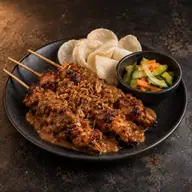 Chicken SatayWith peanut sauce€16.50
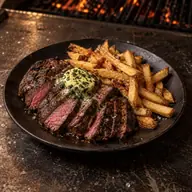 Flat Iron Steak FritesWith herb butter€24.00
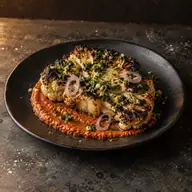 Coal-Roasted CauliflowerWith romesco€13.50
Ordering at table 18
See how that works out for restaurants, cafés and bars, hotels, food halls, festivals and bowling.
Guests pay when it suits them.
Table 18 wants to pay, and can do so straight away with the order or at the end of the evening: together, split evenly or each paying for their own dishes. The payment is booked back to the table in your POS and the money is paid out to your own account.
De Kade · updated 21:14fetching…Your bill · Table 18
- 2×Crisp Lager€12.00
- 1×Chicken Satay€16.50
- 1×House Smash€14.50
- 1×Sea Salt Fries€5.00
- Subtotal
- €48.00
- Tip
- €4.80
- You pay
- €52.80
Tips without pressure
Guests choose for themselves: round up, a percentage, their own amount or no tip. The tip reaches your POS as a separate amount.
Order now, pay later
Several rounds on the table bill, settled once at the end. Available on the Standard and Professional plans, depending on your POS.
The methods guests know
iDEAL | Wero, card, Apple Pay, Google Pay and Bancontact, depending on your payment provider. In a food hall, every stand gets its own payout.
Kitchen filling up? You set the pace.
Meanwhile the tickets are piling up in the kitchen. One tap on the tablet pauses ordering for a while, and everything reopens by itself at the moment you choose.
Pause ordering
Guests can’t order for a moment. With a view-only menu set up, your menu stays browsable. Orders already in stay on the tablet.
Snooze a dish
Soup run out? Snooze it for an hour, twelve hours or a day, and it comes back on the menu by itself.
Ready, without calling out.
For takeaway, at the kiosk or at a festival, every order gets a code that appears on the pickup screen when it is ready. With the optional SMS module, guests who sit down get a text.
See the pickup screen and SMS
Everything lands neatly in your POS.
Table 18’s order and payment are already on the table in your POS. Orderli takes items, prices and VAT from your POS and books every order and payment back, so your team keeps working in the system it knows and closes the day where it always does.
Order #5720Table 18 · today 19:12
On the POS- Ordered by guest
- Paid with Apple Pay
- Sent to the POS
- POS briefly unreachable, tried again
- Accepted by the POS
POS request
Sent to the POS: 5 lines on table 18
- 2× Crisp Lager€12.00
- 1× Chicken Satay€16.50
- 1× House Smash€14.50
- 1× Sea Salt Fries€5.00
- Tip€4.80
The POS put the order on table 18 and registered the payment.
Your menu on top
Photos, translations, allergens and suggestions sit as their own layer over your POS items. What you change is on the menu for the next guest.
Sold out is sold out
When something is sold out in your POS, guests can no longer order it in Orderli, with POS systems that share their stock.
When the POS does not answer
Orderli quietly tries again and shows, per order, what the POS replied, in plain language.
Orderli connects with Lightspeed, unTill, Vectron, MplusKASSA and Trivec, among others. Without an integration it runs on a tablet and your own printers. See all integrations
After closing, the numbers add up.
Table 18 has gone home and the last receipt has printed. The daily report sets out your revenue by VAT rate and payment method, and every payout traces back to the orders behind it. If VAT is missing somewhere, the report says so at once. For your accountant you export Excel or PDF, or a DATEV file for venues in Germany.
ReportsDaily report
Sat 26 Sep 2026De Kade
Total revenue€3,522.60186 paid orders · incl. VAT
- Food and drinks
- €3,310.40
- Service fees
- €64.50
- Tips
- €187.70
- Discounts
- −€40.00
VAT is missing on 1 product. Choose a temporary rate for your VAT return.
| Rate | Excl. VAT | VAT | Incl. VAT |
|---|---|---|---|
| 9% | €2,187.34 | €196.86 | €2,384.20 |
| 21% | €721.24 | €151.46 | €872.70 |
| No VATHouse Lemonade | — | — | €13.50 |
| 21%Service fees | €53.31 | €11.19 | €64.50 |
| Tipsno VAT | €187.70 | €0.00 | €187.70 |
What guests choose
Per dish you see orders, revenue, chosen options and price changes over time, and when it gets busy.
How was it?
After paying, you ask guests how it was. A happy guest can post a Google review straight away; anyone with something to say sends it straight to you.
The morning after: just ask.
Connect Orderli to Claude or ChatGPT and ask in plain language how Saturday went, or put a dessert of the week on the menu. You decide whether the assistant only looks or may also make changes. It cannot place orders for guests or move money. The connection is new and in beta.
You
How busy was Saturday, and what sold best?
Assistant with Orderli
- Orderli · Looked at orders per hour12 hours
- Orderli · Looked at sales per dishTop 3
It was busiest between 19:00 and 20:00, with 48 orders, and it quietened quickly after 21:00. Best sellers: Smash burger (62×), sea salt fries (54×) and house lemonade (41×).
From first call to first order.
You don’t set up an evening like this alone. We get in touch within one working day, build your menu in your own branding and test a complete order before your first guest orders.
- 1We get to know youWithin one working day, about your venue, your POS and how your service runs.
- 2We agree how service runsWhere guests order, how they pay, which ticket goes where and who handles exceptions.
- 3We build your menuYou send us your menu, we build it in your own branding. With a POS integration, your items come from the POS.
- 4Test and go liveA complete order from scan to ticket, a short briefing for your team and the QR codes on the tables.
There is no setup fee. Once you are live, you reach support by WhatsApp and phone, in English, and status.orderli.com shows how our services are running.
How quickly you go live depends on your POS, printers, locations and service. We map that in the first conversation.
In use at venues including









Questions about how it works
Do guests need an app?
No. Guests scan the QR code and order in their phone’s browser.
Does Orderli work without a POS integration?
Yes. You can send the orders straight to your existing printers. If you would rather not, they come in on a tablet next to the till.
Which POS systems does Orderli work with?
Among others Lightspeed, unTill, Vectron, MplusKASSA, Trivec, Bork, Matrix POS, Micas and Povis. What an integration can do differs per POS; each one is described on our integrations page.
What if a dish runs out?
Snooze it from the tablet or the dashboard and it comes back by itself when you choose. With POS systems that share their stock, it also happens automatically from the POS.
What if a guest needs help?
Then your team helps, as always. With the call-service button, the request arrives on the tablet with the table number.
What if the internet or the POS falters?
If the POS cannot accept an order for a moment, Orderli tries again and you see per order what the POS replied. What your team does if the venue’s internet drops, we agree with you before launch and test too.